Friday, 24 April 2015

Task 8 - Review


               The Survey: https://www.surveymonkey.com/r/WWTNMKD


The Questions asked: 


1. What are your first impressions of the environment?


2. Do you think this city level could be used in a game?


3. Does the final product go well with the planning done in the previous tasks?


4. What do do like about the work?


5. How do you think I could improve? Any suggestions for a future environment that 

create? What are your criticisms if any.


Using the responds I received for this survey,  I analyzed the answers and it helped me see
 what the strengths and weaknesses of my project were. 
These answers told me where I can improve on my work,
what was liked about the animation and/or what wasnt liked. 
It also gives me people's opinions.


Q1: What are your first impressions of the blog and the work put on it?
Its good.
Q2: Does it all make sense to you?
Yes for most parts it does but I got a little confused at the ideas generation part because I didn't know what idea you had picked.
Q3: What did you think about the animation produced?
It looks rad! A little Dubstep to go with it and you should be golden for your grade!
Q4: What are things you like about the animation?
Loved the car's movements. I could see in the production that it looked complicated and you did shit frame by frame?! Well done in that case because the car looks fluent
Q5: Please state all things you did not like about the work, the animation or any criticisms you may have on how I can improve my work. 
Only thing I'd say is put music on the video


The overall first impressions of my blog and work were good. It also made sense to this person but they got confused
about what idea I chose in the ideas generation task. This was their own fault as the blog shows that the next task 
shows the storyboard that was finalized and why it was chosen and what the contentof the storyboard means.
The final animation seems to be really admired by this person and they were eager to tell me to add some 'Dubstep'
to the video. (Dubstep is......its music APPARENTLY)
My time on making the car look like it has suspension paid off as the reviewer here called it ''Fluent'' and made a remark 
about how difficult it looks in the production task. The advice I can take here is to add music to the video and I may actually do so.


Q1: What are your first impressions of the blog and the work put on it?
It looks professional to me
Q2: Does it all make sense to you?
No I dont do tech stuff
Q3: What did you think about the animation produced?
It was amazing the suspension on the car when it stops and goes again was what really awed me
Q4: What are things you like about the animation?
The realism of the car movement
Q5: Please state all things you did not like about the work, the animation or any criticisms you may have on how I can improve my work. 
The only thing I can say for this is that it woulda been nice if you put some music with the video but im not into computers so i dont know if that would be too much extra work. I liked the work overall tho.


The work on the blog looks professional. To this person to seems the content of the blog did not make sense 
and they seem to provide their own reason for it which is
''I dont do tech stuff''. 
The suspension of the car really worked well for me because this person too says that it was amazing. 
They liked the ''realism of the car movement''. Room for improvement: Video would be nicer if it had music.

Task 7 - Post Production


                                                                   Video Uploading 


Done


Task 6 - Production

Production 


Having obtained the car model, I selected the rear wheels and moved them to the second layer.

After putting the real wheels on a seperate layer, I did the same with the front wheels.

The chasis of the car was on layer 1, rear wheels on layer 2 and front on the 3rd layer.

I now put the pivot points in the middle of the wheels on each layer. This allows the vehicle to stay held but the wheels to freely and separately spin. 

After the model was ready for movement, I took out my story board and had the vehicle ready.

In order for the car to have a base to rest upon, I went back in Modeller and made a road for it to be used in Lightwave for the animation to take place on. 

The road

I experimented with putting textures on this road but realized it would only be a waste of time as it is not part of the assignment brief. 

Having made sure the car has all objects parented correctly (shown above) 


I started working to the storyboard. I rotated and moved the camera into position.


This is a shot of the part where the car's front wheels turn left after having turned right. 


I added the effect of suspension in the vehicle so the animation would look better. 


Rendering the animation as an avi file


Task 5 - Ethical/H&S Sign-ff


Task 4 - Storyboard

In a rush I chose the fight scene idea as I was just very excited to start working on it and creating it. 

This is the final story board I made for the idea that was later scrapped. Although it does not relate any more to the final outcome, I will still go ahead and explain what the story was and what this image means.
Starting from F1 (Frame 1) The camera is a first person view form the eyes of one of the characters, it zooms out now. Character 1 on the left (C1) punches but Character 2 (C2) Dodges. C2 blocks, C1 goes for another punch, C2 ducks and hits C1 in the his right rib as his hand makes the course of the missing hit. C2 hits C1 in the face and the fight carries on until C1 punches and knocks down C2 .


                                                   THE FINAL STORYBOARD


After having scrapped the fight sequence I looked back at my research and my ideas generation. I saw 2 ideas there that I liked and I decided to merge their ideas and add upon them to create a final storyboard. 

I wanted the animation to contain good camera work, reasonably realistic car movement, car body (chasis) showing suspension when it moves back and forth, car wheels and car shown turning. So having all that in mind I created this story board.

The scene starts with the camera being zoomed out from the rear bumper of the car. The camera goes to it's left and shows the back wheel of the car as it spins and burns with the handbrake still on. The camera goes further left and spins on top of the car and ends up on a bird eye view on top of the car. I car's front wheels turn to the right (left for the viewer's sight) and the car does a donut. The camera now goes behind the car and we can clearly see the back of the car (frame 7 as seen above) Now the car moves forward and the chasis moves to show real suspension. The car suddenly breaks and the suspension is further shown off as the car rocks forth. 

Camera goes to the right, the front tyre is shown to turn right and the car goes right. The same scene is replicated on the other side as the car turns left. Now the camera goes on a side view of the car and the car starts to drive off, at first it is slow and it will show some rocking of the chasis that shows suspension in action while the car changes gears. As the car changes gears and moves, the camera zooms out further and the car drives off. 


Task 3 - Ideas Generation

       Genereating Ideas and thinking about all possible outcomes


While generating ideas I wrote down everything I could possibly create as my final animated piece. 
The possibilities are endless because animation can be something as little as a banana being peeled to something like a film. So with that in mind I thought about the different types of scenarios I can would like to undertake for example I'd rather do a car burnout instead of a banana peeling because I prefer one to the other. 


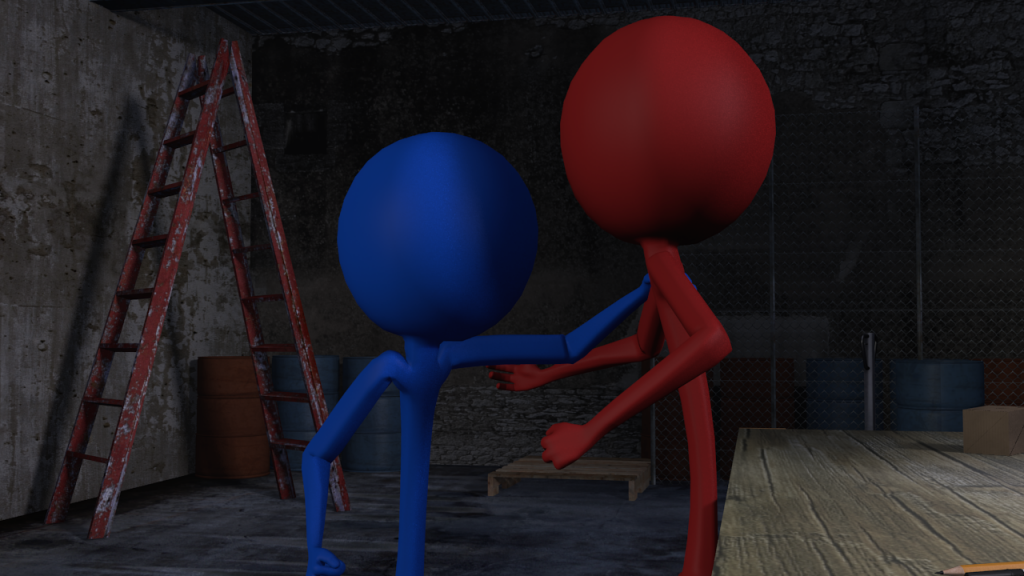
Idea 2 was a fight sequence. From scene 1 to scene 9: Start with an over shoulder shot of the characters. Zoom in so the camera only sees the upper bodies. The two characters throw a few punches at each other, dodge and swerve. 


xxxxxxxxxxxxxxxxxxxxxxxxxxxxxxxxxxxxxxxxxxxxxxxxxxxxxxxxxxxxxxxxxxxxxxxxxxxxxxxxx

A scrapped idea


xxxxxxxxxxxxxxxxxxxxxxxxxxxxxxxxxxxxxxxxxxxxxxxxxxxxxxxxxxxxxxxxxxxxxxxxxxxxxxxxx


One of the ideas was a gun being reloaded. starting from a first person view, the gun in your hands, you empty the magazine, drop it and the left hand goes off screen. The hand is back in the view and puts the loaded mah in the gun and the hands load the gun. 

Annotation on picture


The final ideas 


I started working on the fight sequence but decided to go back to my original ideas so I stopped its production where it was. I came back to the idea board and designed these two ideas: 


Camera zooms out of the bonnet or exhaust of the car, wheels burn and the car drives away. 


Please read annotations next to the idea^


Task 2 - Research


Research


http://www.fea-optimization.com/showcase/showcase01.gif

Although the gif shows an image generated in a physics supporting engine, I still liked the idea of having a car accelerate into a wall or an object and creating a collision effect. Although the collision effect would work to break the wall the car hits, it would not work for the car itself as it is not a physics engine. 

http://www.dlr.de/schoollab/en/Portaldata/24/Resources/images/op/experimente/polygon_contact1.gif

An interesting example of a physics engine animation. This was another thing I found as I was researching animations of cars to get inspired for my own animation. 


I suddenly decided to make a fight sequence animation and I searched examples of what I had in mind and just research in general. I found this picture and it is related to my work because this is the position I want the models to be in the animation (A torso up fight scene).


http://www.port-magazine.com/wp-content/uploads/2013/06/PORT_Cars_2_v1_GIF-RES.gif

Although I had the idea to make a fight sequence, I still had thought about my original idea which was car related and I decided to carry on researching to get inspiration. here is a picture of one of the ideas I had which was to show a car open and close its doors, back and bonnet. 


https://33.media.tumblr.com/c75cb35dca00c261698df7e7be69542f/tumblr_mktblsJFyE1rpdptuo1_r1_500.gif


As I reasearched further, I thought that making a single car fly around and shown to be driving isnt a bad idea. So I referenced this gif to show how I would make the animation. This would be the inspiration for later outcomes.